
Modifying: Sold Report

Here's a quick modification to the Sold Report.
Open up the reports menu and using the ... context menu download the source code.
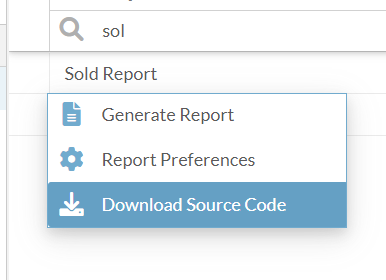
I had to modify the following parameters from:
    <parameter name="soldStartDate" class="java.util.Date"/>
    <parameter name="soldEndDate" class="java.util.Date"/>
to:
    <parameter name="soldStartDate" class="java.sql.Timestamp"/>
    <parameter name="soldEndDate" class="java.sql.Timestamp"/>
Otherwise it would throw a couldn't CAST to java.util.Date error when running the report.
Add a variable to sum the total sold value (cost).
<variable name="totalSoldCost" class="java.lang.Double" calculation="Sum">
     <variableExpression><![CDATA[$F{sold_cost}]]></variableExpression>
</variable>
Now you can manually drop the appropriate text and sum variable. I just copy pasted directly underneath Purchase Cost and changed them over.
Upload your modified report.
You must set - "Show Only: Custom Reports" for "Configure Parameters" option to show up in the context menu.
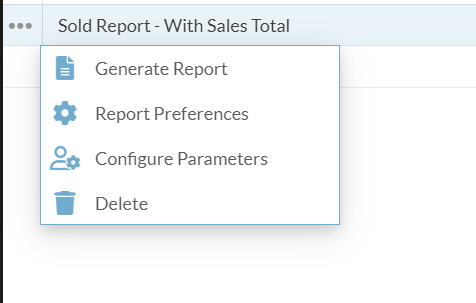
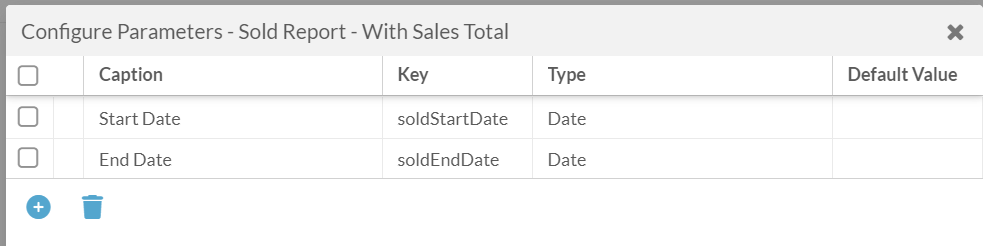
Enter your caption, key, and type.
Now you'll get the dialog popup to enter a date range.
Extra:
WHERE
(serial.IS_DELETED  IS NULL OR !serial.IS_DELETED)
AND (resource.IS_DELETED IS NULL OR !resource.IS_DELETED)
AND NOT serial.is_decommissioned
AND serial.is_sold
Insert the bolded line if you want to get rid of Decommissioned items showing up on the sold report.
Please sign in to leave a comment.
Comments
0 comments