
Quote Views Tab: Is Sensitive View

I don't see this option in my system for quote elements, is the only way to achieve something similar to toggle all the individual fields?
Views Tab
The Views tab is used for configuring the different tabs that run along the top of the element in the first section. This tab is only applicable to Financial Documents and Contact Lists. Each view has its own settings that can be edited or you can create entirely new views. When creating or editing a view, you’ll notice that the settings are separated into different tabs.
The first tab is the General Settings tab and consists of higher-level settings associated with the view. Below are a few of the settings you’ll find in this tab.
- Is Sensitive View: If Yes, any user with the “Can View Sensitive Views” permission denied will not be able to see this view.
-

Hi Marcus,
No. Sensitive Fields are different than Sensitive Views. You should absolutely see the option if you go to the hamburger menu, Projects > Element Definitions > Quote > Views and choose a view, like Working View.
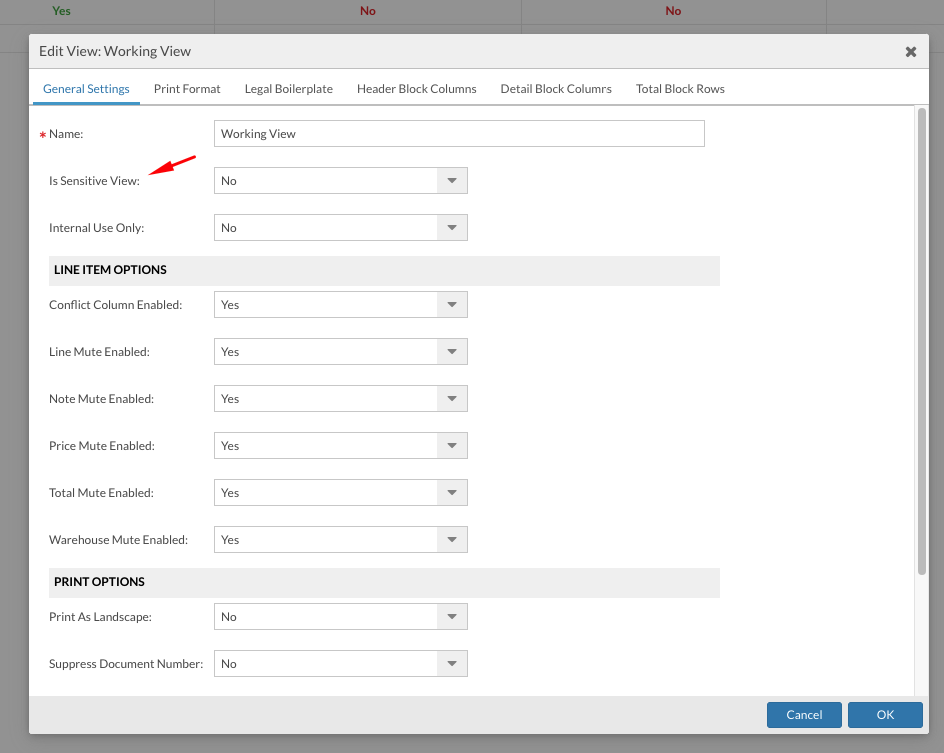
If you're still having trouble locating the option, please feel free to reach out to our support team. Their contact information is at Help > Flex Support Resources under the hamburger menu.
Please sign in to leave a comment.
Comments
2 comments