
Deposit Invoice Appearance

hey, can anyone help with changing the appearance of the Deposit Invoice. In the Element Defintions tab we select Invoices (and also Quotes) but cannot find the Deposit Invoice in the Views tab. the business address is in the wrong place on the pdf document and the font is super small. it does not match our quotes and invoices in formatting and we cannot locate the area in Flex to change these settings. thanks in advance for any help !
-

Hey five by five,
Deposit Invoice is actually a report. You would need to make a custom version of the report to make those modifications. I do a lot of custom reports for Flex clients and am endorsed by Flex. Let me know if I can handle this for you. Contact info is below:
-
Hi Aaron, thanks for the reply ! yes, I understand that it is a report, but isn't the the quote and invoice looks also reports that are eventually turned into PDFs? Im able to alter the appearance of those reports in the views tab of the element definition section. am I missing something? I know this function was easy to do in Flex 4. I dont need to make a custom report, I just want the font and sizing to match what is being already generated by Flex for our quotes and invoices. unless I dont understand how Flex 5 is handling this operation.
-
You're probably using the Default Financial Document (which may be running through your "Generate PDF" option) for your Quotes and Invoices. Default Financial Document is not a normal report and is built specifically to respond to the Views of an element definition. While other reports CAN respond to SOME changes to your Element Definition settings, many adjustments for reports require custom report development work. All that to say, I think you're still going to need a custom version of the Deposit Invoice report.
-

Hi five by five,
Aaron is correct here. Due to the way the Default Financial Document is generated, it currently doesn't match the font used in other embedded reports. Note that I'd expect that to change are we port the report engine to Flex5. Assuming that the Deposit Invoice is up-to-date, the fontface should be Calibri and the detail block will use an 8px font. The other sections vary in size from 7px all the up to 14px. I expect the ported "default" reports will have similar configurations.
-

Hi five by five
I'll chime in as well. At Square Wave we've developed a whole bundle of invoice reports that make it quick and easy to generate great-looking deposit invoices, itemized invoices, and even summary invoices for event folders that contain multiple quote/invoice pairs.
You can see more information on this at our website and here's a screenshot of what the Deposit Invoice version of our reports looks like:
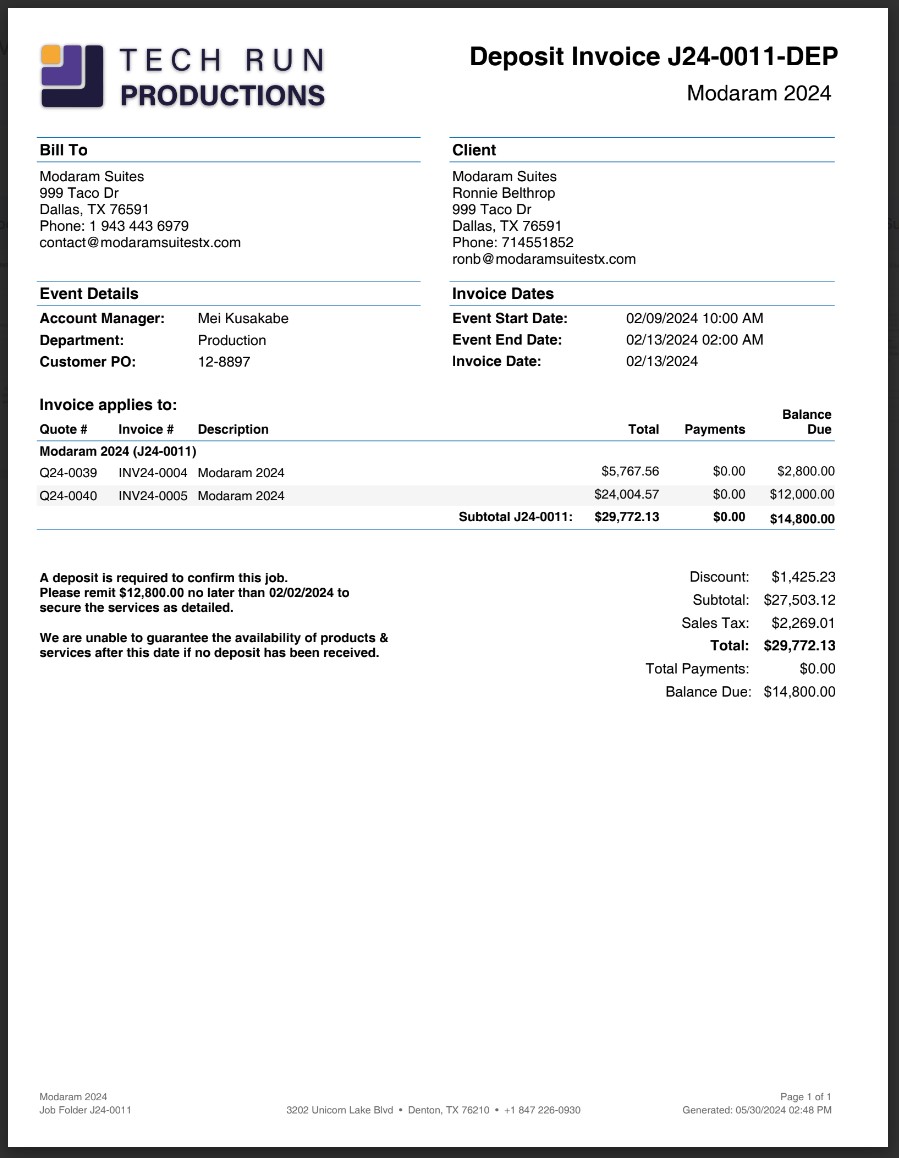
Reach out to hello@squarewave.com.au if you'd like more information - we'd love to hear from you!
Best,
Bigs
Square Wave - Endorsed Flex Consultant
www.squarewave.com.au -
hi, and thanks for the replies everyone! ok, I understand now that this is in the process of being ported over to Flex 5. and as I was saying in my original post, we didn't need to add any new information to the Deposit Invoice, but was just confused at why the Warehouse location and business Address fields were in the middle of the header at the top of the page on my Deposit Invoice look in addition to the very small font. Im not opposed to using the Crystal Reports to modify these items (I'll admit that I havent used it yet), but for obvious reasons, don't really have the time right now. We all have embraced the benefits of using Flex to streamline our production resources. its the beginning of the busy season here in Music and Television and I was just hoping for a very fast solution so I could get back to the flow. ill contemplate the options, but also wondering if we hire someone to edit this we cannot go back and make any future changes to it ourselves I would imagine...
-
five by five, note that Crystal Reports won't work at all. Flex uses JasperReports which is a different library/format. To my knowledge, the two are not compatible.
As to your last concern, you "own" any custom report that's in your system. Meaning, if you hire a 3rd party developer, the result of their work is uploaded into your Flex database and fully accessible and editable by you. That being said, we do have an in-house report developer; if you get in touch with our support team, they can connect you with him.
Ultimately, it's up to you if you choose to work with our guy, Aaron, or Bigs. All will produce a great result, though Aaron and Bigs may have things ready-made that only need slight customization.
-
right, and thanks Randy, I meant Jasper Reports actually, but Crystal was in my head for some reason. but as I mentioned we haven't used it yet to make any changes to Flex so im sure there is a learning curve. ill probably use the route as you suggested and hire someone. how long does something simple like this take to turn around ?
-
It is certainly possible to use Jasper software to modify Flex reports, but the learning curve varies from moderate to very steep depending on what you're trying to do.
For example, you would think that it would be simple to download the Jasper software, open a report template file from Flex, move a field from here to there, then save and upload. It turns out that if you do exactly that, it won't work, because the default settings of the Jasper editor don't match Flex's report engine.
And that's just for a simple formatting change! Once you get into changing the data that is present in the report, things can get complicated quickly. While many companies have built up the capability to modify their own reports, and I am supportive of these efforts, it's often easier and quicker to contract a specialist for report customization.
At the moment, Square Wave can probably turn around a project like this within a few weeks.
I hope that helps!
Please sign in to leave a comment.
Comments
10 comments