
template quote numbers

We have several template quotes within our system for regular venues that are designated as (temp-0001), (temp-0002) etc instead of having the year as the first part of the quote number. Can someone explain how to do this? It was a previous user who entered these templates, who no longer works here, and when i Mark Quote as Template, it locks the quote and numbers it with the year first (24-0001), (24-0002) etc. I want other users to be certain they are working with or copying an original template and not a copy of a template or an edited template. Hope this makes sense!
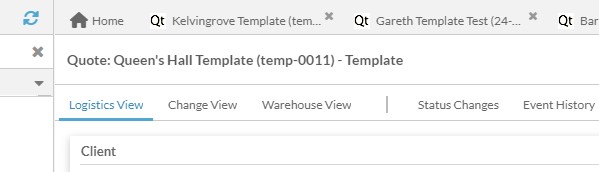
Cheers
Gareth
-

Hey Gareth Mitchell,
Every element type (ex. Quotes) has an assigned numbering scheme. I can't know for sure, but the previous user may have just been manually editing the job number for those templates. There's not a way through the workflow to have it switch the numbering scheme. If the Template state is a locked state, it would be pretty easy to build an option to temporarily unlock it so that you could change the number if you have any workflow editing experience. If not, then I can build it for you. I'm endorsed by Flex. Reach out via contact info below if you'd like some help.
Aaron Horn
Flex Consultant (endorsed by Flex)
aaronjhorn@gmail.com -

Hi Gareth Mitchell,
Feel free to reach out to our support staff (support@flexrentalsolutions.com) for assistance with this. This can be hard to determine through a forum; much easier if they know your customer information and can take a look at your system to see how it's configured. I can think of at least a couple of ways to accomplish this, but would require more information to know for sure.
Please sign in to leave a comment.
Comments
3 comments