
Increasing all pricing at one time...i.e. increase everything 2%

Anyone know if there is a way to do an across the board price increase, instead of doing it within each individual item?
-

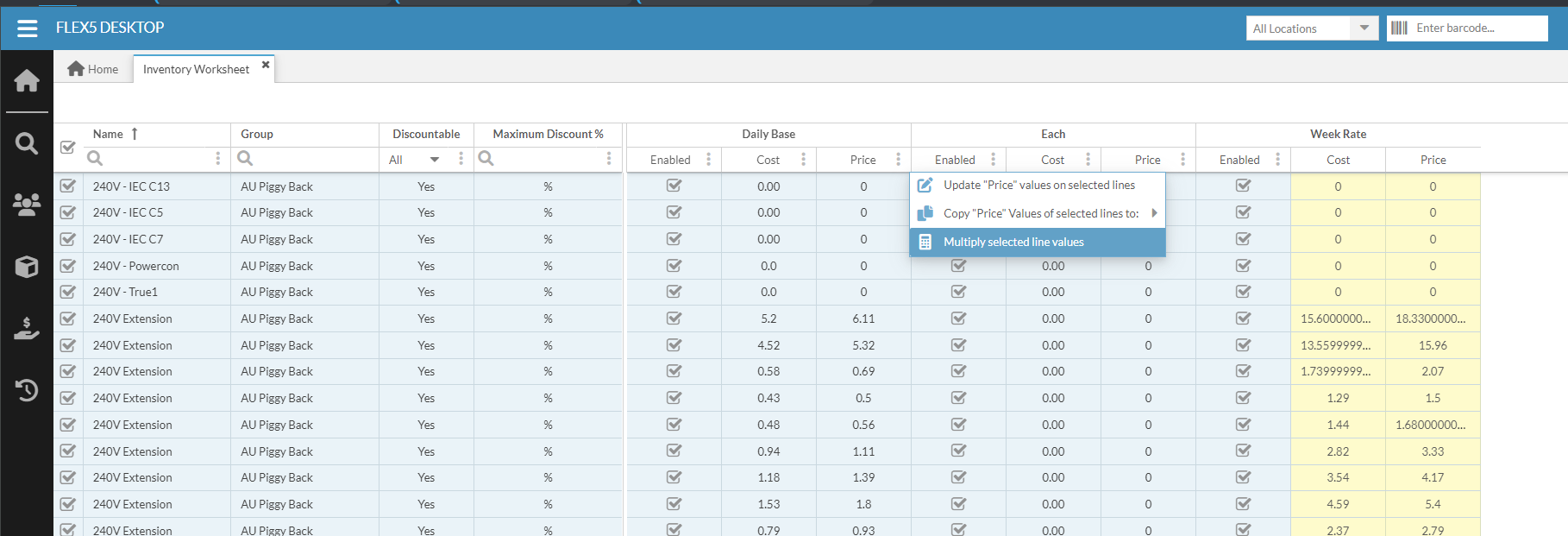
You can do this using the Inventory Worksheet, though you are limited to changing 50 models at a time (the max number of records shown per page).
Steps:
- Main Menu > Inventory > Inventory Worksheet
- Switch to Pricing Model in the dropdown at the bottom of the screen
- Select the desired rows (or select all with the top checkbox)
- Click the 3-dot menu in the Price column of the desired pricing model
- Select 'Multiply selected line values'
- Enter 102% in the percentage column (or whatever your desired increase is)
There are also 2 other ways to achieve your desired outcome.
Option 1 - new pricing model. Create a new pricing model, set it to be a multiple of the existing pricing model i.e. 1.02 of the current Day Rate model. Now make the new model default everywhere. This would work but it might not be ideal.
Option 2 - an "update" style inventory import. Flex Support or Flex consultants can run inventory imports for you for a fee. Basically we export all inventory models with pricing, you update the prices in spreadsheet (or tell us a formula to use), then we re-import them back into your system in bulk, updating all the pricing. This is the cleanest way to update your pricing across the board.
Reach out to hello@squarewave.com.au if you would like more information on the import method.
Cheers,
Bigs
Square Wave - Endorsed Flex Consultant
www.squarewave.com.au -

If you make updates via the inventory worksheet as Benjamin 'Bigs' Coppel mentioned -- Does the new price effect old quotes? What if a line is adjusted (change qty from 1 to 2), will the new price pull in?


Please sign in to leave a comment.
Comments
4 comments