
My calendar by project manager

Has anyone found a way to make "My Calendar" pull orders where you're listed as project manager? as opposed to orders you've entered yourself?
-

Hi Greg-
Here's what I found in the Calendar Settings page of the Help Center:
- Personal: Determines whether or not this calendar is personal to you. If you select yes, only you will be able to view the calendar.
- Contact Association: Enter a contact name and the calendar will only show jobs in which the contact is the "responsible person."
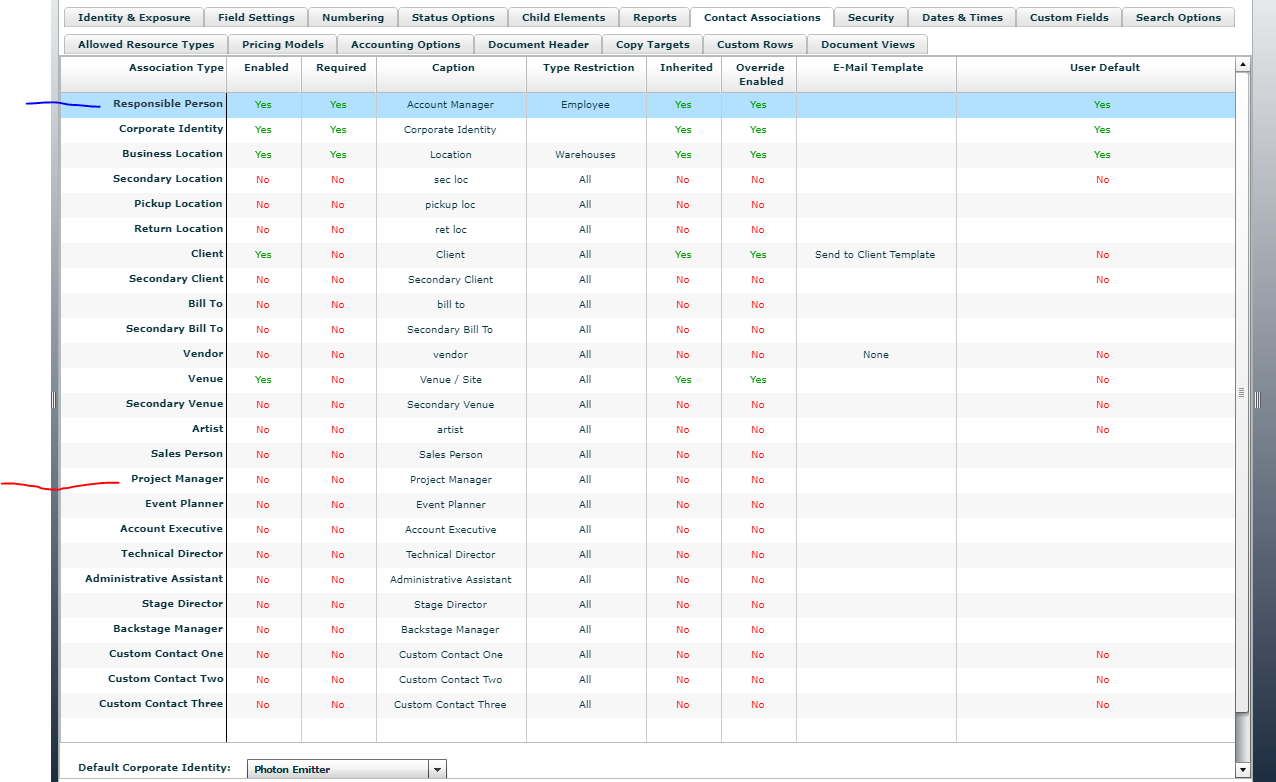
You may want to double check the Contact Association settings for the relevant project elements to see if what you are calling 'Project Manager' is the Responsible Person or not. That may change whether this is working for you.
Go to Projects menu > Project Elements > Quote (or whatever element you are checking) > Contact Associations tab.
In the screenshot below, the Responsible Person is called an 'Account Manager' - this is the contact that is searched when using the 'Contact Association' setting in the calendar config. There is no way that I know of to filter by the 'Project Manager' contact.
Hope that helps!
Bigs
Endorsed Independent Consultant
bigs@squarewave.com.au
www.squarewave.com.au

Please sign in to leave a comment.
Comments
2 comments