
Scanning Quantities

Is it possible to instead of having a window pop up whenever a non-serialized item is scanned that prompts the user to enter the quantity that is being scanned in or out, to instead be able to just scan each non-serialized bar code multiple times, each scan counting as one item?
-

Hi Nathan -
Yes there's a setting in Inventory menu > Inventory Settings called 'Non-serialized Item Scan Prompts for Quantity' - set that to No and every barcode scan of a non-serial item will scan a single of those items instead of prompting for quantity.
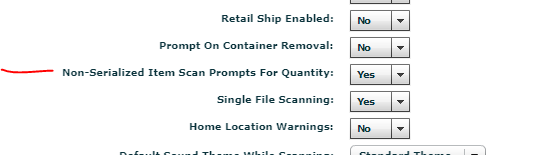
This is the only way to change this setting, and it's a global on/off for your whole Flex system.
Cheers,
Bigs
Endorsed Independent Consultant
bigs@squarewave.com.au
www.squarewave.com.au
Please sign in to leave a comment.
Comments
1 comment