
Breaks In Inventory Tree, Quotes, and Pull Sheets

I want to create a separate tree for sales to pull packages from. Is there a way to create a line break in the inventory tree to denote the 2 separate folder trees? The last place I worked had a "PM" tree that was separated by a line.
Also, with the auto sort function can it add a few line between Inventory Groups to separate them a little on the quote and mostly for the pull sheet. Right now the pull sheet seems a bit busy and we want to have some clearer breaks between groups.
Thanks in advance!
-

Hey Atticus,
There's not a way to have separate sections in the inventory tree. Some Flex clients use just a separate Sales folder at the top. I personally recommend that you put a sales folder within and at the top of each root folder so that you can still enjoy the auto subtotal creations, but it's a convenient accessibility for the sales staff.
I don't believe there's a way to add auto blank lines between subtotals/groups. Hopefully you're aware of how to add blanks through either clicking on a cog wheel of a line, or using the insert mode and dragging them in to where you want them to go.
Thanks Atticus! Let us know if you need anything else. I'm an independent consultant endorsed by Flex.
Aaron Horn
Consultant (Flex endorsed)
aaronjhorn@gmail.com
+1 615.335.1225 -

Hi Atticus-
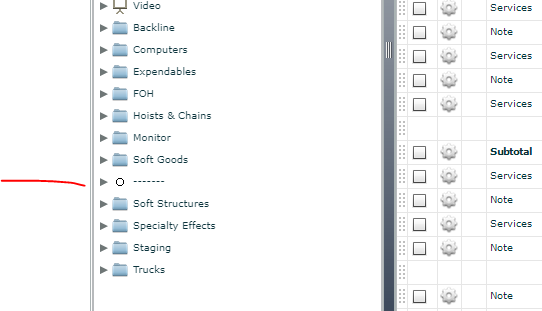
While Aaron is correct that there's no way to actually separate the inventory tree, I found a workaround which I assume is what your previous employer did. To create a 'break' in the inventory tree, just create a new inventory group, label it to look like a line, and leave it empty. It won't allow you to input spaces to get a blank break, but can use characters as shown below. You could upload an all-white icon to make it look even cleaner.
With regards to auto-adding blank lines on the pull sheet or quote report or just generally making the reports more readable, that is easily done with a custom report but there's no othe good way to do it that I can think of. I'm an endorsed independent consultant and custom report developer, shoot me an e-mail if you would like to discuss the options.
Cheers,
Bigs
Endorsed Independent Consultant
bigs@squarewave.com.au
www.squarewave.com.au
Please sign in to leave a comment.
Comments
2 comments