
Using "Finalize" to Push Workflow

Right now when we finalize a pull sheet the stats changes to "Manifest Created"
How do I make changes to the workflow to utilize the Finalize button.
My goal is to have hitting finalize on the prep pull sheet change the status of the quote to "Prepped" and then when the return manifest is finalized have that trigger the quote to say "Returned."
Thanks
@
-

Hey Atticus,
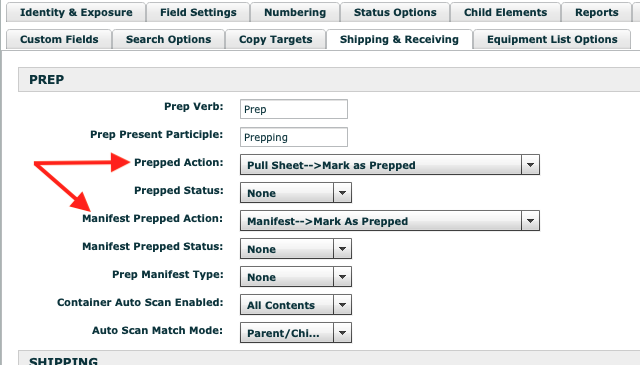
You'll have to build the desired workflow actions in the Pull Sheet and Manifest workflows for the "Prepped" and "Returned" state change if it's not already. After you have the workflow action built, you'll need to assign it to the Finalization trigger. This is done through Projects > Project Element > Pull Sheet (or Manifest) > Shipping & Receiving tab. For the Prep scan process, in the Pull Sheet settings under the PREP section, assign the desired workflow actions to the Prepped Action (for Pull Sheet) and Manifest Prepped Action. Set the Prepped Status and the Manifest Prepped Status to none for the ones you're going to use a workflow action for. For the Return scan process, in the Manifest settings under the RETURN section, assign the desired workflow action to the Returned Action (not the Manifest Returned Action). Below is a picture of an example for the Prep finalization.
If desiring to change a Pull Sheet status/state with the finalization of a return, you'll need to do that through the "Chained Parent Action" of a Manifest workflow action. Just choose the appropriate Pull Sheet workflow action there.
Hopefully that's not too confusing. I do a lot of workflow customization for clients. Let me know if I can be of service with any Flex, reporting, and inventory control related consulting.
p.s. Often, for Finalization actions, you have them originate from a workflow state called "none" or something similar if you don't want them to appear as an available workflow action when viewing the Pull Sheet or Manifest in Flex. That would isolate the workflow action to only be used by the Finalization function if that is desirable.
p.p.s. The instructions are assuming you only do a single scan out and scan in process. Some clients have a double scan out or scan in process. The assigning of workflow actions would be a bit different in those scenarios.
Aaron Horn
Consultant (Flex endorsed)
aaronjhorn@gmail.com
615.335.1225 -

Hi Atticus-
Aaron's thorough information above is absolutely correct. I'll come at it from a different angle, which is to use the default Linked workflows which Flex has created and can be automatically installed on your system if they're not already there. I think this will do what you want.
Are your Pull Sheets and Manifest already using the Linked workflows? You can check by opening Projects > Project Elements > Pull Sheet. In the workflow drop-down, does it say Pull Sheet Linked Workflow? If not, is that an option in the dropdown? If so, switch to it. Same with the Manifest project element.
If it's not an option, see this webinar for instructions on how to automatically install the Pull Sheet Linked Workflow and Manifest Linked Workflow using the Data Updater function. These workflows are built to be linked together, so when you finalize the return process for the Manifest, the Manifest and Pull Sheet are both marked as Returned.
Then you just need to ensure that the Shipping and Receiving settings are correct for Pull Sheet and Manifest.
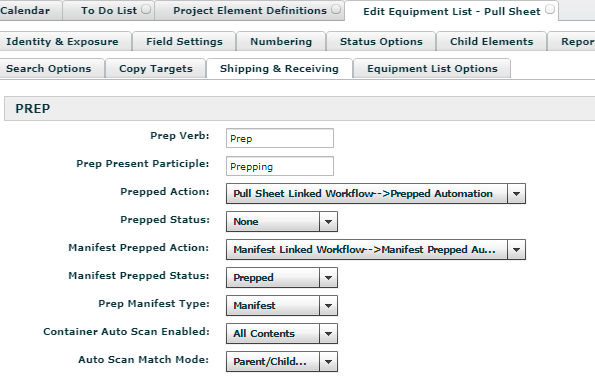
Go to Projects > Project Elements > Pull Sheet > Shipping & Receiving Tab and make the Prep section it look like the screenshot below. All other sections should be blank / default.
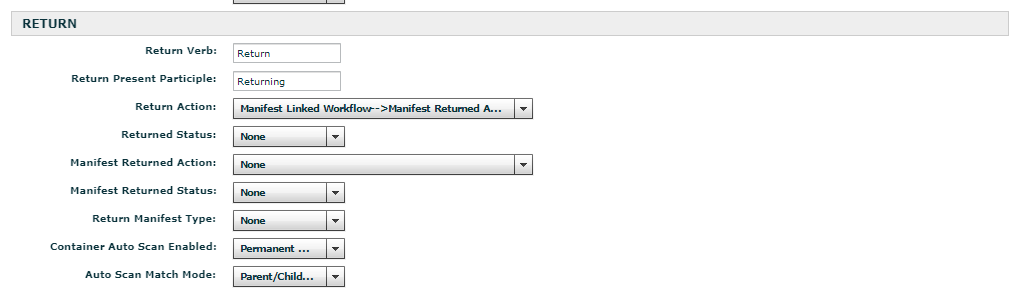
Go to Projects > Project Elements > Manifest > Shipping & Receiving Tab and make the Prep section it look like the screenshot below. All other sections should be blank / default.
I hope that helps. If you are still having trouble after trying any of the above ideas, email Flex Support with exactly what you want and they can fix things up for you.
-
For the Prep Finalization, you can assign a Quote action to the "Chained Parent Action" of the Pull Sheet workflow action that you have assigned to the finalization.
For the Return Finalization, I can't remember if you can chain 2 levels up to the Quote. You would have to assign a Pull Sheet action to the the "Chained Parent Action" of the Manifest action tied to the Finalization, and then also have a Quote action assigned to the "Chained Parent Action" of the Pull Sheet action mentioned prior. I just can't remember if doing 2 generation chains works with the Return finalization.
If you try, reply back and let everyone know if it worked.
-
The new status assignment will be handled by the workflow action assigned to "Manifest Prepped Action", so it's redundant (and possibly conflicting) to use both the status and action options. You'll see in my original post that I have the status fields set to "None". Hope that helps!
-

Hi
My name is Jimmy and i have a question about this settings.
I'm trying to change the workflow for the finlayze command, (Manifest Linked Workflow>Returned) to also generate an Email so my friends in the warehouse sends me an email directly after pressing finlayze. more or less the same function there is for confirming Qute email.
I'm trying to get as much communication within flex as possible. is this possible? I haven't had any success so far.
Thanks and i hope you all have a good day/nighet
-
Hey Jimmy,
Most likely in your system, you'll need to click on "Manifest Returned Automation" in that workflow to open its action edit page. Here's a pic:
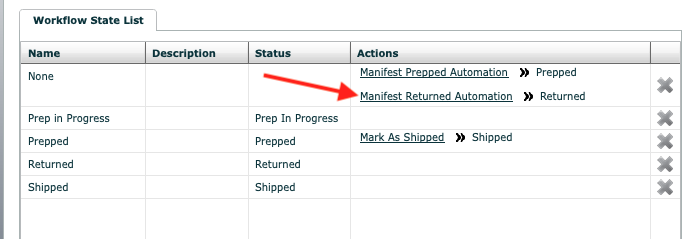
Once you have that open, you'll want to add an "Outflow Job". You probably don't already have an email notification job built specifically for returning manifests, so you'll need to build one. Here's how:
- Go to Projects > Workflow Jobs.
- Open up an existing email notification job like "Pull Sheet Created"
- In the right pane, select "New Report E-mail Notification" ("New Simple E-Mail Notification" does not work. It's a known bug. So make sure to use the Report one.)
- Fill out the fields in similar fashion to the "Pull Sheet Created" job. You can copy and paste between the two where beneficial.
- Be sure to add the appropriate email addresses to the "To Address" field. Finalizing the Return Screen will not bring up an email notification pop-up like confirming a quote, so only email addresses that are populated here will receive an email when finalizing the return.
- Click on "Create" in the lower right corner of your new workflow job
Once you've created your email notification job. Return to the "Manifest Returned Automation" action edit page, and add your newly created email notification job to the "Outflow Jobs". (If you had the action edit page open while you were building your new email notification job, you'll likely need to close the action edit page and reopen it to see the new notification as an option.)
That should get you going Jimmy. Chime back if you have any issues. I'm an independent consultant endorsed by Flex if you need any direct help as well.
Aaron Horn
Consultant (endorsed by Flex)
aaronjhorn@gmail.com
615.335.1225 -
Jimmy, I had erroneously listed the wrong job type to use with the trigger. Should have been "New Report E-Mail Notification Job". I've edited the previous post. Apologies!
-

Hey Aaron,
Old thread I know, but I would like to do basically the same thing: Have an email notification auto-send when a Manifest is fully returned and finalized.
So when I finalize returning a manifest from the return screen, the status of the Manifest automatically changes to "returned" which is fine and correct. I'm assuming in the years since this thread and with Flex5 around for a bit now that function was built in without the workflow changes you mentioned in this thread.
What I can't find is the "auto" workflow action that triggers this status change when "finalize" is hit, in order to assign the email notification workflow job to that action. You had a screen shot of it above.
On my flex, there is a Manifest Workflow, but it seems all those status changes are happening automatically upon finalization of pullsheets (outgoing) and finalizing of manifests (incoming) as no workflow is enabled in the "Element Definitions" --> "Manifest"-->"General" screen.
Thank you!
-
Hey Chris,
Newer instances default to using the Linked workflows for PS's and Mn's. Yours may not, though it's curious to me that you don't have a workflow assigned. You'll need to assign an appropriate manifest related workflow to pull off the email action.
In your element definition settings for Manifest, check the Return section of the "Shipping & Receiving" tab. It's probably using "Returned Status" instead of "Returned Action" to trigger the status changes. To pull off the email notification, you'll need to be using "Returned Action" instead. This is basically where you tell Flex what to do when you Finalize a Return Screen. If you tie it to a workflow action, then you can add an email job to that action. Make sense? Let me know if you want me to jump into your system to take a look Contact info is below.
Aaron Horn
Flex Consultant (endorsed by Flex)
aaronjhorn@gmail.com -
Hey Arron,
This is helpful thank you. I *almost* have it working. I have "returned action" in the "shipping and receiving" tab in the manifest options working as intended. It is executing the "mark as returned" workflow action properly upon finalizing the manifest with a return scan of the last remaining item. The "returned status" is now set to "none". However it is not sending the email I set as a workflow job for the "mark as returned" workflow action.
The email workflow job works when I *manually* mark the manifest as returned, but not when the return scan triggers the finalization/status change.
I will email you our Flex url if you want to go in and take a look.
Thanks
Please sign in to leave a comment.
Comments
13 comments