
Event folder element tree, status and dates and show parent elements only as a default

This is more of a feature request, but it would be nice to hear if others have had similar thoughts regarding this issue.
We use event folders to manage projects that contain several quotes. We make several different levels of event folders, below which are quotes and other sub-elements.
The problem is outlining the project and finding the right elements within the project.
If the element tree opening on the right side also gave information about the elements enough that we could quickly see the status and the start/end time, then navigation within the projects would be much easier.
I understand that this is not necessarily useful for all users, but would it be possible to even make these optional so the user can enable / disable this from the element definitions?
Using filter inside the main event folder could help our departments to monitor their own elements but we would still have the whole picture of the project for statistics.
It also causes problems that the elements are visible by default.
Our biggest projects have more than 500 elements, so it would be great if everything could be closed in the same way as the home and calendar view. (lower left corner "Show parent elements only")
Attached is an example of the features and how their selection could be structured. I think the best way to build this would be like the search field on the element definitions.
The structure and logic of the elements and event folders is already well done, but this is a big minus from the point of view of project management.
-P.S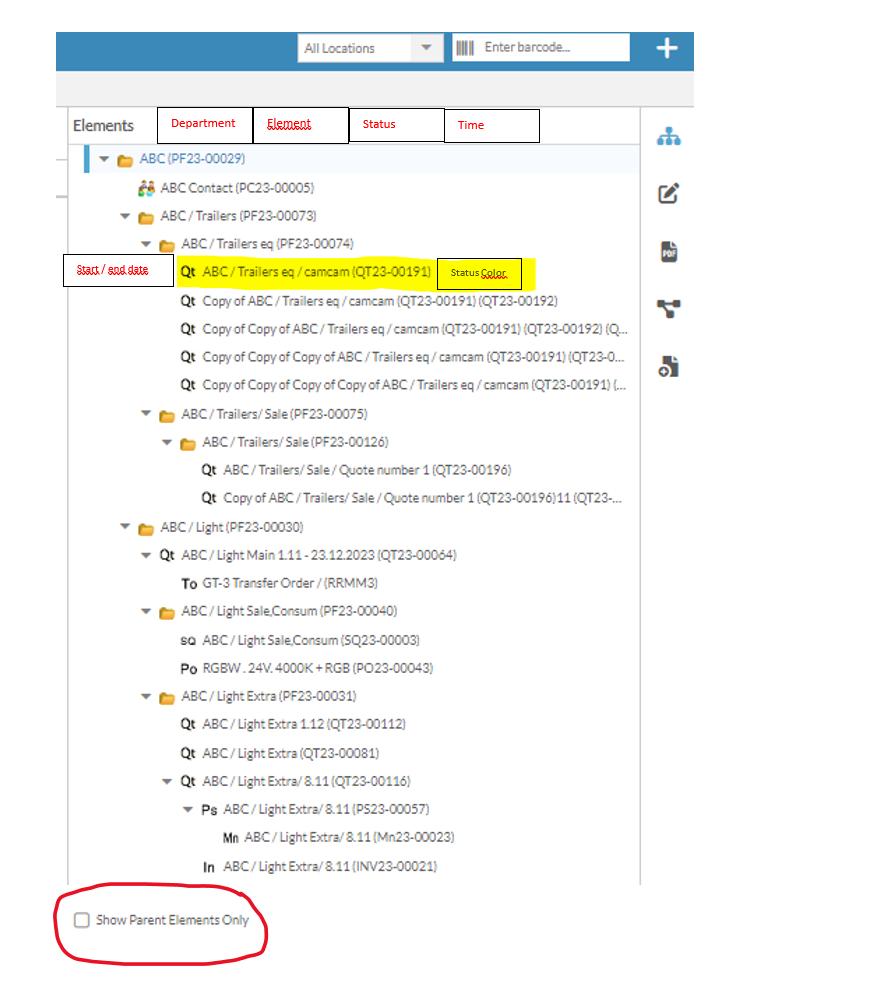
Iniciar sesión para dejar un comentario.
Comentarios
0 comentarios