
Long term rental pullsheet

Looking for a way to essentially "free scan out" equipment for a long term rental.
Background: Our company has a filming studio attached to our warehouse and occasionally we "lend" (see renting for $0) our equipment out to the studio for production.
Ideally we would have a running manifest that has equipment scanned in and out so we know if the equipment is in use in the studio or is sitting on a shelf in the warehouse. Is there such a way to do this other than adding lines to a manifest (as a document) and then scanning said items out from the warehouse prep screen?
-

Hey Séan Brown,
Here's a few options I've seen from clients:
1. Purchase an additional "warehouse" from Flex for your studio. You'd likely want to use the Transfer element functionality to scan between warehouses which is turned on for multi-location Flex instances. This is probably the cleanest strategy since you'd be using Flex's intended mechanism for this. Less negative implications or unintended challenges.
2. Create a dedicated manifest. I know you've already thought of it, but it's hardly more work than using Free Scan Out. Just create a Pull Sheet for the purpose, but you don't need to add any items to it. Then, through the Prep Screen, scan things out as needed. Gives better accountability and more information than a Free Scan Out. Major drawback is that you can not scan a serialized unit onto the manifest more than once. So you may end up having to juggle more than one manifest either broken up by time period, or purpose, or etc.
3. Use a Storage Container. Basically, make a fake inventory item that can be a serialized storage container, and name it "Film Studio" for example. Then simply scan the equipment into the container. If you don't want the items to show as available availability engine calculations, then make sure the container is set to be Contents Available - No. A client of mine that uses this method actually did multiple containers to specify what part of the studio it was in, like "Studio FOH Truss". Possible drawback is that the serialized units will still have their location show as your original warehouse, but they will additionally list the container (Film Studio) they're in.
Those are some general ideas without knowing more details. Let me know if I can be of service.
Aaron Horn
Consultant (endorsed by Flex)
aaronjhorn@gmail.com
615.335.1225 -

Hi Sean -
We also loan out equipment on occasion, often to friends at no cost and somewhat frequently, but want to be able to track where and when they are out as well as exactly who has the gear. After a solid year of trying different ways out of doing this, we've settled on this:
We have essentially created a "Loaner List". We've found the best way to do this without having to worry about effecting financials downstream is to create a new "pull sheet" from scratch who's date range is the full calendar year. The pull sheets title is "Loaner List". Whenever we "loan" out an item or many items to someone we create a Virtual Group within the pull sheet using their name. And then add whatever items we are loaning them to that named virtual group. Once all items are in the virtual group for that individual we simply go to the prep screen and scan the assets out. This of course creates a manifest.
Once they're ready to return the loaned equipment we go to the automatically generated manifest, select each item's "related scan records" and delete the prep scan for the items being returned to us. Then all that's left to do is delete the items from the virtual group (and if you want, also delete the virtual group) from the pull sheet.
Some important notes. Never "finalize" the prep. Also, once its a new calendar year you can adjust the "header" of the pull sheet to reflect the new calendar year both in name and in date range.
I've taken some snapshots
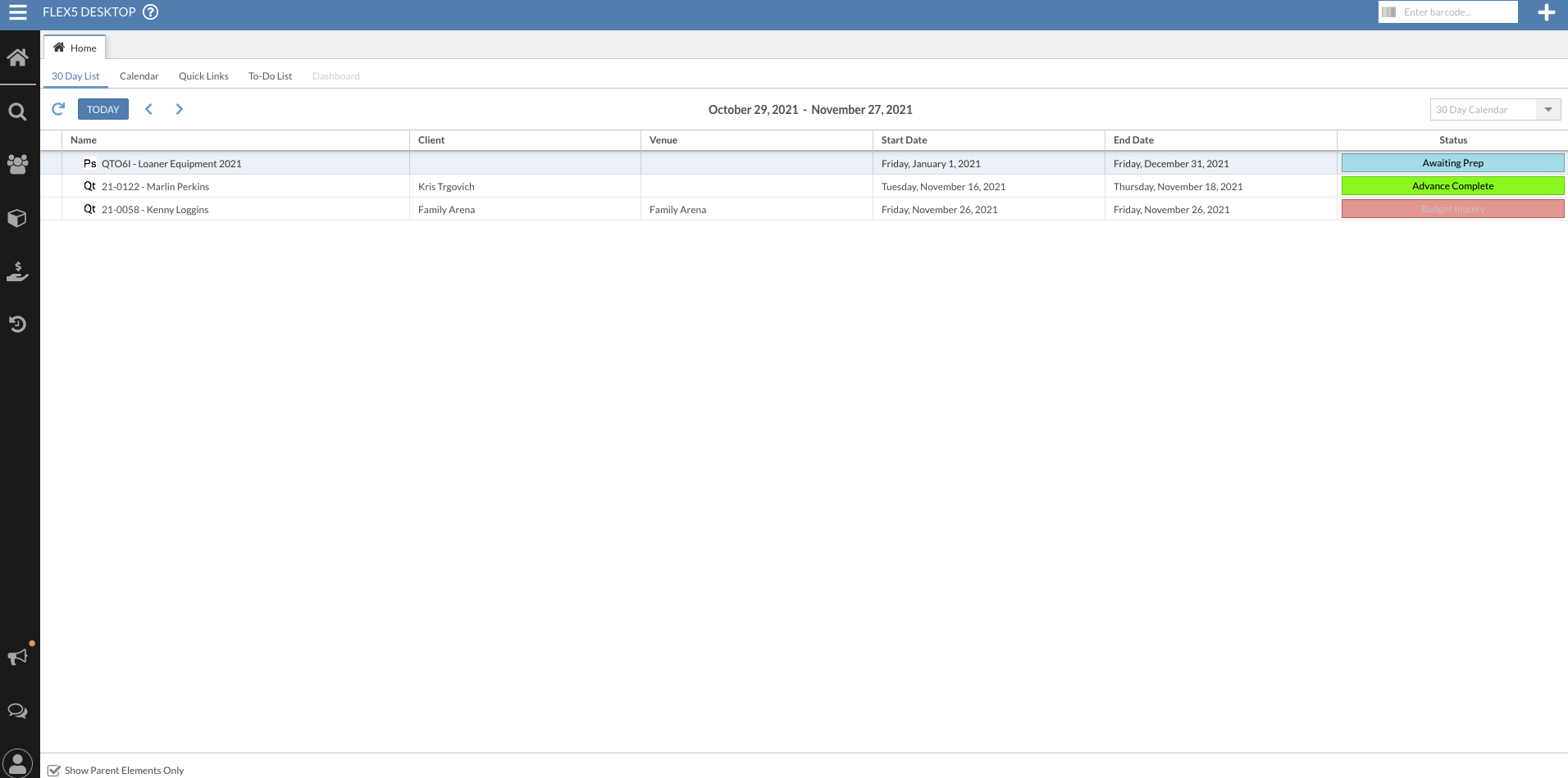
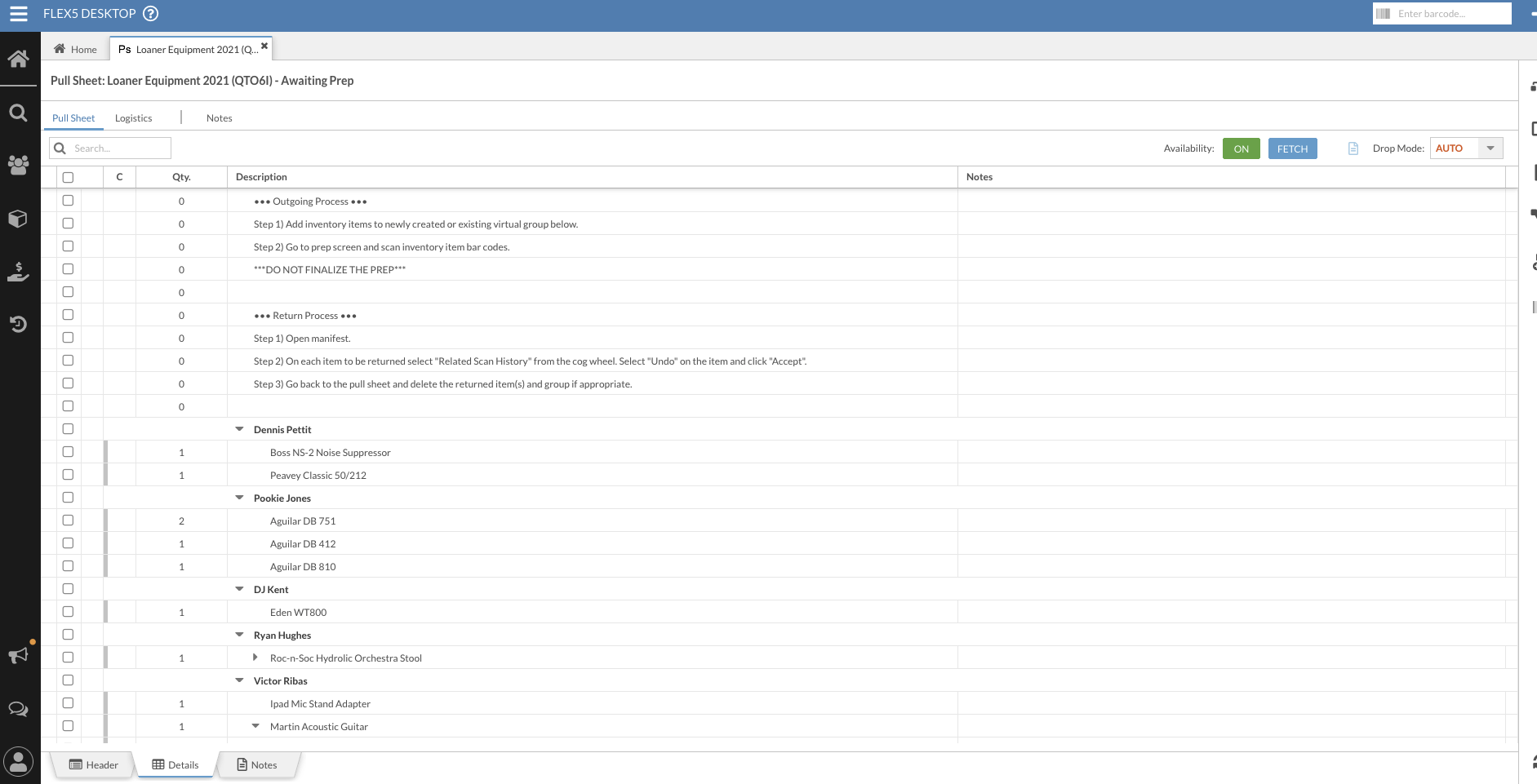 to show our "Loaner List" and attached it here. You'll notice at the top of the Pull Sheet I placed note lines explaining the loaner process so that our warehouse staff will always know exactly how to do it.
This has worked well for us over the last few years because it makes asset availability counts accurate and we can see exactly whom we've loaned the gear to and when.
Hope This Helps!
Please sign in to leave a comment.
Comments
2 comments