
Bulk Move Items

We have a sales side to our business. Unfortunately RETAIL items still show in inventory after sold. They do not show as available but appear in the list of serial numbers.
Also, there are return manifests associated with the sales.
Is there a way to do bulk moves for the serial numbers under an item? For the time being we do not what to delete them or more specifically the history of them.
Solutions or thoughts welcome.
-

Hey Atticus,
2 recommendations. The 1st probably feels like a non-answer which is to get used to seeing the sold items in your list of units. You can always sort however you like if you need to (for instance) just review active Rental assets This works better for long-term reporting to have the sold units associated with the same model as the ones you actively rent. Maybe we can persuade Flex to adjust the units list options/settings down the road in Flex5 as your issue is not uncommon from my experience.
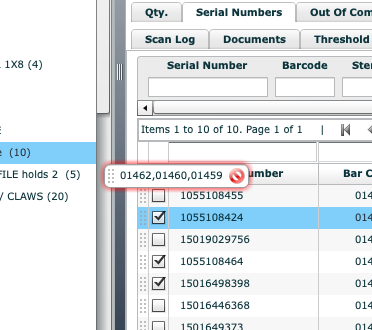
The 2nd recommendation is to create a sold version of the same model and then move the sold units to that new model. You can bulk move units by checking the boxes of the sold units from the units list, and then simply dragging them to the new model in the inventory tree. You drag them by grabbing the "perforated" area to the left of one of the selected unit check boxes. Pic below may help. This may get a little confusing if you do this after the processing of the sale as the documentation will show the original model name. There may be a couple other drawbacks with it historically.
I agree that you don't want to delete or remove history. That's good information long-term.
While there are manifests, that doesn't mean they need to be "returned". The manifest is simply your list of what actually went out the door for the sale. If everything was set to retail prior to being scanned out, you're good to go. If you're unhappy with the status of the manifest, you can build a manual workflow action to get it to a status that represents manifests that were for sales purposes after you've finalized.
Like many things in Flex, there are multiple ways to handle it. Someone else may chime in with other ideas. I'd be happy to work with you directly to develop some of your SOP's if you can allocate the resources. Let me know if I can be of service.
Aaron Horn
Consultant (Flex Endorsed)
aaronjhorn@gmail.com
615.335.1225 -

Hi Atticus,
To get rid of the return manifests for sales, I manually mark the equipment as returned and then finalise. This means that against each inventory item it will still show us what 'job' the equipment was sold on.
You can also 'return' all the items and (I believe) they will say 'SOLD - 'your location''
To do a bulk move - Select all the serialised lines of an inventory type then click in the 'dots' area and drag into the inventory tree to the folder you want to drop them in..
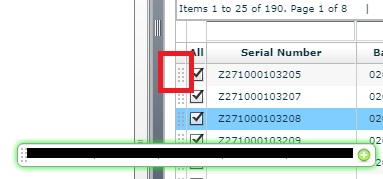
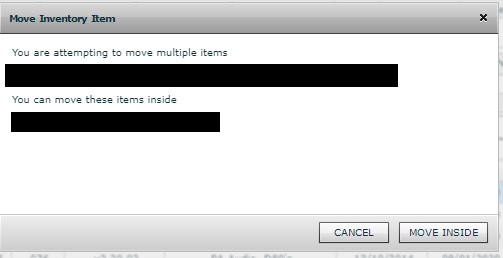
The only problem that i see here is that you will have to make a new 'sold' inventory item folder for every type you are selling or you will loose the original inventory description.
I personally delete everything that's been sold and use the Inventory > Inventory Manger to look at deleted stock if i need to. You can double click on a deleted line item and it will still open up the Serial number details tab.
-
Re: The sold items showing in Inventory issue.
It would be good if Flex could show Sold items in a different colour.
In the software we used previously, they would be 'greyed out' and there was a tick box to select between how the inventory item was viewed . Either active / sold or all stock of that type.
Please sign in to leave a comment.
Comments
5 comments