
Shortages producing false results

Shortages feature barcodes that are both on active jobs and historical jobs - and therefore reducing availability, however, should we return said item from the aged job, this will affect the current location. I strongly feel that an active job should be removing (returning) the barcode from any aged job, as this is counterproductive, skewing the actual shortages lookup.
-

Hey Mark,
Sounds like you're dealing with serialized units since you reference "current location". Units can only be in one location at a time. Are you saying that you have units that are still appearing unreturned on a historical job while they've been scanned out to a current job? Or maybe the historical job is still appearing on the Conflicts tab of the Conflicts & Availability pop-up? Usually looking at the Availability Details tab will clarify how the availability engine is calculating. Feel free to show pictures or share more detail.
If you want direct help, I'm an endorsed Flex consultant of 10 years now. Email is below.
Aaron Horn
Flex endorsed Consultant
ahorn@redhoundsolutions.com -

Hi Mark Semple,
Again, please reach out to our support team through the app so we can better assist. These things require clear details (and knowing which system you're working in) so we can fully understand the issue and get you back on track.
-
Hi Aaron - yes, serialized units and appearing on historical jobs, and also on recent jobs. The availability is reduced as it's taking account of the historical jobs. I can't return from the historical jobs as that will return the units to the warehouse - affecting the most recent job.
-
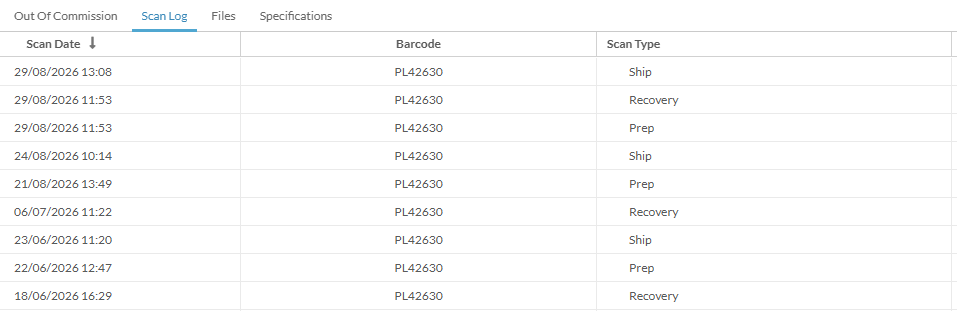
For example, this barcode is showing on a job in June, however, on viewing the current location, that's not in sync. If I'm to clear the historical job from June, then that would return said item to base. I've had to limit what I can actually share here, but hoping this should suffice. First is the inventory dashboard.

-
I've had a look at the ticket, but unfortunately, it's hard to tell exactly where all of the screenshots come from. You're also not clear on your terminology, which makes it difficult communicate with the precision we need here.
The "barcodes" you're referring to are "serial units" or simply "units." These are unique pieces of a certain "inventory model" which has a "serialized model" system configuration. In this case, if I'm understanding the model naming correctly, a 20m and a 50m 32/1 extension cable.
DPF has 119 50m cables "allocated" (i.e., owned). And 788 20m cables.
You cannot "be short" a specific unit. It's either in the warehouse or not. You _can be_ short on the model. Meaning, all 119 50m cables are out on jobs, or OOC, or some other state that makes them unavailable. And that does appear to be the case as I write this (according to the Schedule). You're short 84. Unfortunately, availability is a very tricky topic and subject to at-the-minute data. For example, if you've got 100 of these on a job that's "past due" by a few hours (or even minutes), but physically on a truck at your warehouse and subsequently checked in by the time you read this, was the shortage real? You definitely wouldn't see it how I saw it.
You mention a specific 20m 32/1, PL34948, as "not returned, but also on a recent job." It's unclear where you're seeing that. Everything I see indicates it's out on a particular job, scanned to Manifest 26-0405.
As for PL42630, I'm not sure what happened. I can see it has a recovery scan, but also see the entry on the dashboard; the associated line on the manifest doesn't appear to have been returned. We have seen this in the past, but I can't personally recall how it happens. That said, I feel like it's a bug, but without an idea of how it happened, we can't easily fix the bug. And that being said, it should be possible to clean up some of the historical record issues, but we need to be precise as such fixes are typically accomplished via direct database changes, which means we skip a lot of stuff the system does during a scan, just to clear up these artifacts. Again, this needs to go through support.
What I'm struggling with, and why support and training are the right place for this, is your workflow and system configuration. From the few jobs I've looked at, it doesn't appear that any Prep or Ship screens have been completed and Finalized. All Manifests remain in "Prep in Progress." It also appears that the team regularly relies on Prep -> Ship -> Prep (which results in Recovery) and completely skips any specific inbound (i.e., Return) scan process. While the system should reliably handle that for units, it's impossible to reconcile for non-serialized models (i.e., the system config for a model whose unique assets are not worth individually barcoding). I haven't looked that deep into your system, so that may not be an issue, but something worth noting if you're trying to get a handle on the system as a whole.
There are two best courses of action here. First, if you're aware of specific units having issues, I recommend trying to clean up the historical issues when the unit is back in the shop between jobs. I realize that's often easier said than done, but you likely have an intimate knowledge of the inventory that an outsider simply won't.
Second, if the scale is to great for option 1, send a list in to support as you find them and we can "check off" the lines on the manifests to clear up things like the inventory dashboard. However, and I hope this helps, please know that the dashboard is much more of a bookkeeping tool; it does _not_ plug into availability. So, at worst, these are "display only" issues. True availability is seen in just a few places: the Schedule, Inventory Browser > Availability, and Line Items on an Element. From Schedule or Line Items, you can access the Conflicts dialog, which shows conflicting element, pending returns (if a serialized model), and availability details. These are the more powerful tools as they all plug directly into the availability engine.
Hope that helps... I know it's not fun when stuff doesn't look right. We'll do our best to help you get it sorted.
Please sign in to leave a comment.
Comments
8 comments