
Chained Action off the Manifest Generation

Hello:
I don't know if this is possible and have been experimenting without any luck.
Our company uses many chained actions for pull sheets and transfer orders to change the status of both the manifest and parent document when a workflow action is triggered.
I want to set up a chained action off the manifest generation (once the first scan happens) to change the parent document of the manifest to change statuses.
Any help/tips are greatly appreciated.
Andrew
-
David Panscik I am trying to change the parent document status (either the Pull Sheet or Transfer Order) when the manifest is generated.
In our Flex system, when a manifest or transfer order manifest is generated, its initial status is 'Prep in Progress'. I want an automated way for the Pull Sheet or Transfer Order status to change to 'Prep in Progress' when this happens. The only solution I can find at the moment is a manual trigger of a workflow action.
-

This is a multistep complicated process, Ill try my best to explain how to do this. Hopefully I don't accidentally neglect to explain an important step.
We do something similar. When scanning begins we have a manifest change the "Pullsheet" status to "Prep In Progress". For the purpose of the screen shots making sense, I will describe how to make a Manifest trigger a Pullsheet. The workflow to make a Quote trigger is exactly the same.
_____________________________________________________________________
Setup the Pullsheet workflow first.
Your system can have multiple Pullsheet workflows. Only one Pullsheet workflow is being used. Identify which Pullsheet workflow is being used.
From a pullsheet workflow select "New Workflow State"
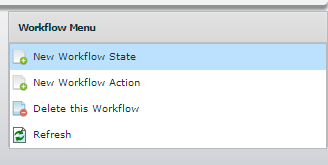
_____________________________________________________________________
Name the state "Prep In Progress". Its quite possible in your system you can have multiple documents that have the status "Prep In Progress" so give it a unique identifier so you can find it later. I used the identifier "PS" to identify this is the "Pullsheet - Prep In Progress".
Be sure to select from the dropdown "Status" menu "Prep In Progress". If you don't have this status, let me know and Ill walk you through how to add a status.
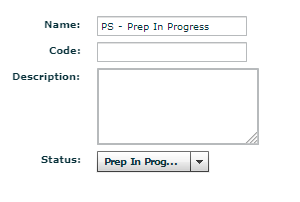
_____________________________________________________________________
Now create a Pullsheet workflow action. Again give it a name so you can find it later. I named mine "PIP toggle". A better name would have been "PS-PIP-toggle"
Source State: None
Target State: PS-Prep In Progress
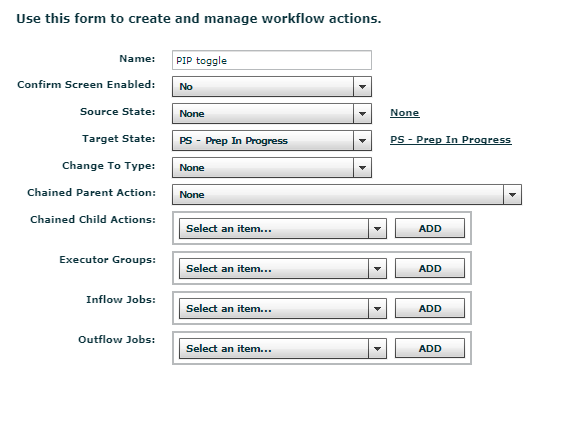
_____________________________________________________________________
You are now done with editing the Pullsheet workflow, now go into the Manifest Workflow (again you may have multiple manifest workflows in your system, determine which manifest workflow is in use on your system).
In your Manifest workflow, create a NEW workflow action.
Give it a name that makes sense "PIP to PS"
Source State: None
Target State: Prep In Progress
Chained Parent Action: "(Name of Pullsheet Workflow)-->(Name of the Pullsheet Action You want to trigger)"
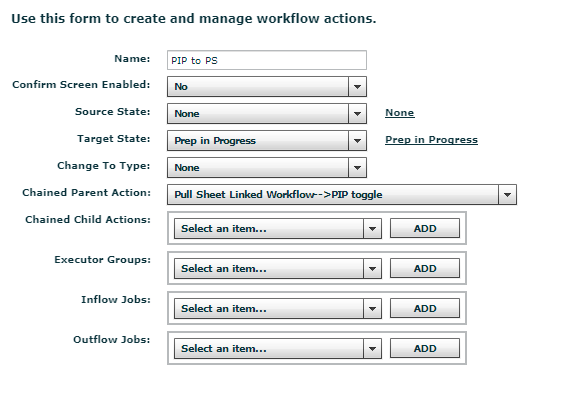
_____________________________________________________________________
That should be it! Give it a test. Let me know if you get it going!
-

Hi Andrew-
AFAIK it is not possible to do exactly what you want. When you prep scan the first item on the Pull Sheet, it creates a Manifest in 'Prep in Progress' status but there is no workflow triggering action there. As you and David have both identified, it would require a manual action to change the Pull Sheet status at that point via a chained action.
Zooming out for a second - what specifically are you trying to achieve with this enquiry? What's the end goal of having the Pull Sheet status reflect the fact that prep scanning has begun? Also, could it be solved with a simple procedural change? For example if your procedure to begin prep was:
- Open the Pull Sheet
- Click the 'Mark as Prep in Progress' action
- Then click 'Go to Prep Screen' and begin scanning
On a related note, our Operations Dashboard product is nearing completion and it will include a list of upcoming Pull Sheets with their actual prep progress shown in a live dashboard view. You can read more, see a video of our proof-of-concept, and sign up for our newsletter here: https://squarewave.com.au/flextools
Additionally, if you require any advice or assistance on improving your Flex (and related business) workflows, that is part of the wide array of services that Square Wave provides to Flex users.
I hope that helps!
-Bigs
www.squarewave.com.au -
Hi Bigs:
Our end goal is simply to have Pull Sheet status reflect the Manifest status of Prep in Progress once scanning has begun automatically. It seems though that this isn't possible and we have created a workflow action to Mark as Prep in Progress for Pull Sheets.
Our company has actually created our own dashboard, similar to what you have as we didn't know something like it existed. I will definitely check out SquareWave though as I'm sure it has more features and stability.
Andrew
-
Andrew Brodkin I have an idea that could work for you. Email me at bigs@squarewave.com.au to discuss.
Cheers
Please sign in to leave a comment.
Comments
7 comments