
Transfering a prepped rental to another warehouse

We have a warehouse in Houston, San Antonio and Dallas. Sometime we need to send a rental from say Houston to Dallas as the client is based in Dallas. We process the rental equipment in the Houston office. Is there a way to add already prepped equipment to a transfer order from Houston to Dallas?
-

Hey Bbowers, when you say "prepped" and "process the rental equipment", I'm going to assume you're prep scanning these items onto a manifest for the job in Dallas. When you are scanning equipment out through a Transfer Order, you can use the "Choose From Another List" option to search for the manifest that you previously prepped the items onto. But I suspect this is not ultimately what you are wanting. Since items can only be in one "location" at a time in Flex, this would effectively return those items from the job's manifest you originally prepped and move them to the Transfer Order's manifest. And you can't rescan items back onto the original manifest later.
If you're wanting to transfer those items to Dallas before they go onsite, then I would recommend copying the items from the job's Pull Sheet onto the Transfer Order and scanning them out through the TO first. Then let Dallas handle the prep scan of those items to the actual job's manifest after they receive and potentially inspect. This is the more natural way in Flex.
Keep in mind that containers are really great for speeding up this process since a few scans are required before the job is complete. There's a few other nuances to this process. Let me know if you would like some consulting help with this, or chime back if I'm misunderstanding.
Aaron Horn
Flex Consultant (endorsed by Flex)
aaronjhorn@gmail.com -

There absolutely is an easy way to process this.
I would recommend that you create a Transfer Order from the job of whatever is required to get from Dallas, even if that is the entire job. Prep the Transfer Order in Houston and then when it arrives in Dallas you can use the "Choose from Another List" feature to prep the Pull Sheet without having to receive and then prep them manually. This will receive the gear and prep it in a single "virtual" process.
Please note that if you don't see "Transfer Manifest" among your Element Types on the Choose from Another List you will need to go to "Main Menu > Inventory > Inventory Settings" and update the elements in the "Flow Inventory Settings".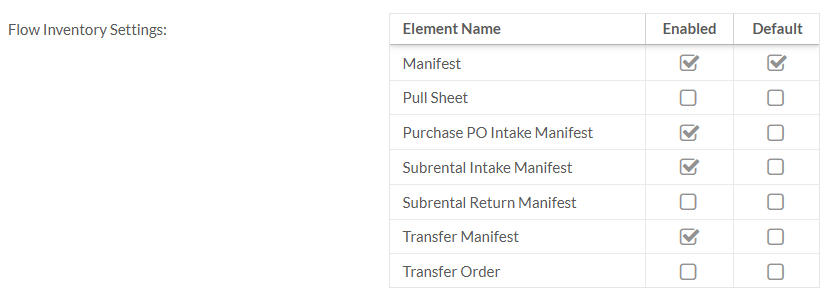
Hope this helps!
Markus
markus@squarewave.com.au
Please sign in to leave a comment.
Comments
2 comments