
Is the camera part of the app abysmally bad for any one else?

We have so much trouble using the barcode scanning part of the Flex 5 app. We usually just end up typing all the numbers in. Does any one have a fix for this? The old Flex app worked so well. Total night and day difference. Maybe we are missing a setting or something?
-
Official comment

Dan,
The camera functionality for Flex5 was added as an additional feature but it was never meant to replace the barcode scanner. The Flex5 app works great with Bluetooth scanners which you can connect directly to your phone or tablet. I would recommend using a scanner in place of the camera. While the camera may be great for a quick one-off scan where you forgot your scanner, there definitely is no replacement for having a true barcode scanner. If you need any recommendations for Bluetooth scanners I would check out the Motorola LI4278 Bluetooth model. This is the Bluetooth version of the regular scanner that we always recommend and is easy to set up and use with Flex and Bluetooth. If you have any issues setting up the scanner with your Flex5 mobile app, please email us at support@flexrentalsolutions.com and we would be happy to help out!
https://www.barcodesinc.com/motorola/part-li4278-trbu0100zwr.htm
-Eddie
Comment actions -
I get that, and we have scanners in the warehouse, although they like to un-pair from the phones they use randomly.
When we are on site and need to QC gear and scan it to go to another venue, everyone uses their phones to scan. This is where it bogs us down the most. The camera is painful. Its a little odd that the NEW version of the app has a WORSE camera function. Having scan guns out in the field isnt practical.
-
When you say the "new" version, I assume you are speaking to a recent update of the current Flex5 app? If so, can you please email us at support@flexrentalsolutions.com with some information regarding the current app version and when you started noticing the issues? As I said, we definitely recommend scanners, but I understand your use case and if you are noticing that the functionality was working better on a previous version I would like to get that information over to the developers. As Flex5 is in active development, we are working hard to address any issues that you may have. I will keep an eye out for your email. Thanks!
-Eddie
-

Hi Dan,
Not sure if this info is useful or not but is it scanner size that's part of the issue when out of the warehouse?
A couple of years ago when we were testing out scanners I managed to find a small 2d barcode scanner which seems to happily pair with an iphone/ipad ( approx 1/3 of the size the iphone7)
https://www.opticonusa.com/products/companion-scanners/px-20.html
It seems to still work quite well when we need it too.
Nick
-
Hey Nick-
Thanks for the recommendation, that's a pretty compact unit. I would like to find a solution that doesn't involve us buying more hardware. Even if I buy this, I still need to connect it to the phone I am trying to scan with in the first place. Its not like we use old crummy phones, everyone has a newer iphone or android. I think its kind of odd that the camera was good in the flex mobile app, but its worse now in Flex 5.
Dan
-
Hey Dan Pollock,
I had a good discussion with our product manager about this issue yesterday. The old Flex mobile app was only for iOS and was using native camera functionality. For ease of development across different mobile platforms, he let me know that we are currently using a third-party package to read and accept the barcodes. While I don't have an immediate solution for the camera functionality versus the old iOS app, he let me know that he is working to be able to implement a native solution for both iOS and Android that would work better than the current package they are using. We appreciate your feedback and thank you for sharing your experience with us.
-Eddie
-

Hi,
Has there been any movement on this?
This Page:
Says flex supports 2d barcodes.
However the flex mobile app doesn't seem to support qr code, data matrix or aztec code.
What is the official line on best barcode type to use assuming you want the most reliable scan on kit that goes to hostile environments.
-

Jon Pusey We are using 2d Data Matrix codes on most of our kit including cables and have no issue with the flex5 app on IOS reading these codes using the built in camera or with a bluetooth scanner pared to the device.
-

Hey Jon,
What device are you using? Android's somewhat nebulous nature makes it difficult to troubleshoot generally, compared to iOS.
Presently, the app's built-in scanning function which uses the device's camera does scan QRs in iOS. On the android device I have, I can confirm that it does not scan QR codes. As far as this functionality changing recently in android, I am unsure how that could be, as the last update to the app was in 2019.Regarding the article in the help center- I wrote this, and I will admit it is potentially confusing, and will include it below, and will be revising it for clarity.
- "We also support all standard symbologies, including Code 39, Code 128, Interleave 2 of 5, and 2D symbologies like QR, Data Matrix, and others."
This is said strictly in reference to scanners. The way scanning in flex works, as long as a barcode scanner can transmit the information it gets, in plain text, as a "keyboard" or "HID device" it will typically be configurable with Flex without much issue, which is to say-
- "Flex can work with virtually any modern barcode scanner which can have “scan rules” applied, and can otherwise be connected to a computer or mobile device as an input device, which transmits scans in plain text."
Flex itself does not currently "support" (which is to say, is generated or read directly by Flex software) any symbology except Code128, EAN-128, Interleave 25, PDF-417, and UPC-A with the Cheat Sheets functionality in Flex4.
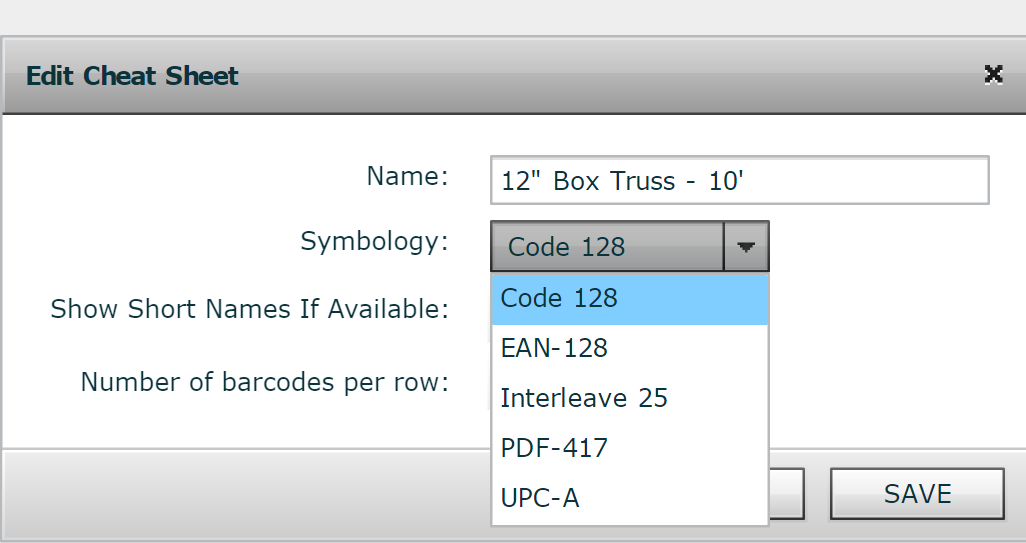
Past this, barcodes/QRs/etc. are read by the scanner, and are generated (when applicable) by the printer, Flex parses the number passed by the scanner, or sends it to the printer to be generated.In the Flex5 app, the built in scanner functionality utilizes an API, which is unique to the platform. To be candid, I'm not familiar with the specifics past this, however, I do know Apple's environment is a bit more walled, which may be why the APIs are not the same and why conversely the one in the iOS version may have that additional compatibility with 2D codes.
It could also be possible that the "fork" of Android your device uses may have substituted its own camera API, and after an update from your device OEM or from google, the functionality has become "broken"
Presently the development team is hard at work on bringing new integrations to Flex5 on desktop as well as continuing to bring more functionality over from Flex4 during this transition process. Once this progress is further along, we will likely look at the mobile app for improvements, updates, and new features.
Regarding your query about "best barcode type to use assuming you want the most reliable scan on kit that goes to hostile environments." some community members may be able to give advice from different experiences, however in my experience, the media the label is printed on, adhesive site prep, the media being printed on the label itself, surface area and material- these are the critical details. Most vertical line/1D codes can take a decent horizontal gouge and still be readable, and QRs can be set with varying levels of error correction which can aid readability under high-wearing conditions
But for some items, it's nearly impossible to guarantee an identifying tag will stay affixed, through wear or otherwise, which is why I believe many people I have worked with typically permanently mark items which experience wear to the point labels don't stay on them, usually the barcode number with a handheld engraver. Stenciling is also a good option for plastics and a natural fit in Flex, I've always had excellent luck with Marsh stencil ink.
Another recommendation I like to make is to search for and contact local labeling material and equipment suppliers in your local area- in my experience, there's usually one in light/medium industrial areas, and they can sometimes offer competitive rates and fulfillment times, beating out online retailers, in addition to high-level experience and industry knowledge.

Please sign in to leave a comment.
Comments
11 comments